_______________________________________________________________________________________________________
Research Objectives and Questions
_______________________________________________________________________________________________________
This research proposal outlines the development plan of a web-hosted augmented reality (AR) birdwatching app prototype. This prototype will feature a high-fidelity 3D model of a bird with various animations and comprehensive information about the bird’s habitat, diet, and behaviour. The scope of the project allows for expansion to include multiple bird species, enriching the educational and interactive experience. The primary goal of this research is to design and develop a prototype for an AR application that enhances the birdwatching experience through digital interaction and immersion. Birdwatching, while a popular hobby that fosters appreciation for wildlife and conservation efforts, requires specific conditions such as favourable weather, the availability of suitable habitats, and the physical presence of birds, which can be limiting factors to the overall experience due to their unpredictability. This research proposal aims to provide an innovative alternative to traditional birdwatching by leveraging AR technology.
_______________________________________________________________________________________________________
How can augmented reality be leveraged to provide an engaging and educational birdwatching experience?
_______________________________________________________________________________________________________
AR can project high-quality 3D models of birds into real-world environments, allowing users to view and study birds up close. These models can include realistic animations showing birds in motion—such as flying, perching, or singing. This creates a more vivid and engaging learning experience compared to static images or videos.
AR applications could be used to display detailed information about a bird when a user interacts with it, such as by tapping on the digital bird. Information can include species characteristics, habitat preferences, diet, migration patterns, and audio recordings of calls or songs. These contextual overlays enrich the user’s understanding without interrupting the immersive experience.
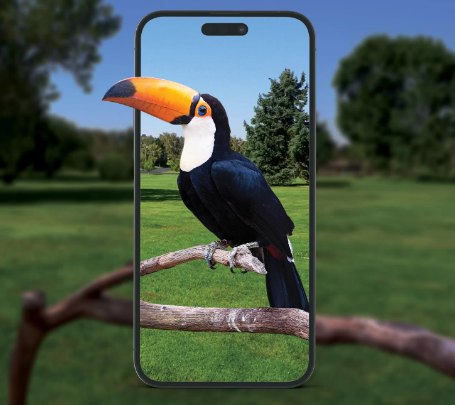
Potential to add gamification elements, such as quizzes or challenges that test a user’s ability to identify birds or match their calls, can make learning more enjoyable and interactive. These activities can also incorporate rewards or badges to incentivize continuous engagement and learning.
_______________________________________________________________________________________________________
What user experience (UX) elements are critical for maintaining a natural and immersive interaction in an AR birdwatching app?
_______________________________________________________________________________________________________
Detailed and accurate models play a vital role in maintaining immersion within an AR birdwatching app by bridging the gap between digital representations and real-world expectations. These high-fidelity models ensure that users experience the app as a seamless extension of their natural environment, enhancing both visual and educational engagement. In an AR birdwatching app, the authenticity of the digital birds is a primary factor for immersion. Users are more likely to be absorbed in the experience if the birds are portrayed with intricate details that mimic their real-world counterparts.
Anchoring refers to the process of fixing a virtual object in a specific location within the real-world environment. In an AR birdwatching app, anchoring ensures that the 3D model of a bird remains stable and positioned as if it were genuinely present in the environment. Effective anchoring depends on accurate environmental recognition, which involves detecting surfaces, textures, and depth using the device’s camera and sensors (Jeff Batt, 2020). When the anchoring is well-executed, users perceive the bird as naturally perched on a branch or flying across their view, fostering a believable and interactive experience.
If anchoring fails, the bird might shift unnaturally or appear detached from its surroundings, breaking the immersion and reducing user satisfaction. Proper anchoring, therefore, allows the user to move around and observe the bird from different angles, enhancing the illusion of a physical presence. Anchoring and positioning directly affect user engagement and the quality of the AR interaction. When users can approach and observe the bird from different perspectives, it deepens the learning experience and makes the app more interactive and educational.
Ease of use is critical in the development of an AR birdwatching app to ensure users of all experience levels can navigate, interact with, and fully benefit from the application. A user-friendly design fosters engagement, enhances learning, and contributes to the overall success of the app by making complex AR interactions intuitive and accessible. Buttons, icons, and menus should be clearly labelled and positioned where users naturally expect them. For example, educational overlays about the bird should be easy to access and close without obstructing the bird model. Utilizing familiar icons and straightforward language helps guide users without overwhelming them with information.
_______________________________________________________________________________________________________
What are the technical and ethical challenges in developing an educational AR application?
_______________________________________________________________________________________________________
Ecological Impact Awareness: While promoting the appreciation of birds and wildlife is a positive aspect of such an app, developers should be mindful of any potential unintended consequences, such as users disturbing actual bird habitats for comparison or inspiration. Clear guidance on ethical birdwatching and conservation practices should be integrated into the app.
Accessibility: AR apps need to be inclusive and accessible to users with different abilities. Providing features like customizable text sizes, audio descriptions, and alternative interaction methods ensures the app can be used by as many people as possible (Luis Talamantes, 2023). Failing to incorporate accessibility features can exclude certain user groups.
Data Privacy and Security: Like many mobile apps, AR applications may collect data such as user location, camera access, and interaction patterns. Ensuring user data is protected, stored securely, and not misused is a significant ethical consideration. Adhering to data privacy regulations (GDPR) is essential to maintain user trust (Data Protection Act, 2018).
_______________________________________________________________________________________________________
User experience
_______________________________________________________________________________________________________
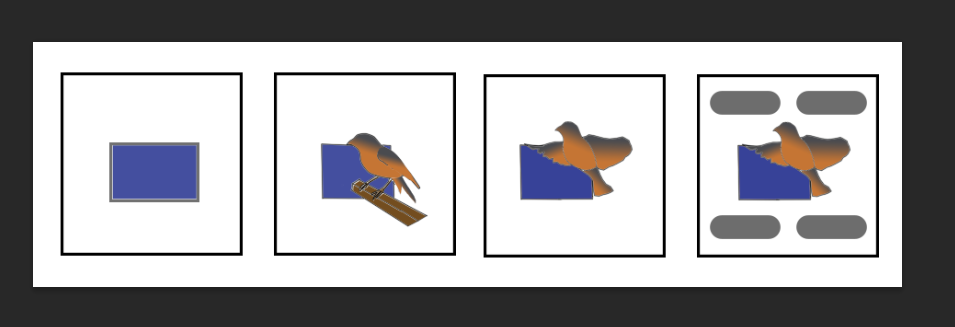
The prototype will be a ZapWorks (Zappar ltd. , 2011) Augmented Reality project which will allow the user to view the 3D model of the bird with the use of their mobile device. The app will be designed with simplicity in mind to not overwhelm the user and avoid clutter. The prototype will include interactive elements such as buttons to cycle through different animations for the bird as well as overlays with educational information about the species, including information about the diet, behaviour, habitats and migration patterns.
_______________________________________________________________________________________________________
Project outline
_______________________________________________________________________________________________________
The nightingale ( Luscinia megarhynchos ) was chosen as the focus for this AR app prototype due to its unique status and appeal among bird enthusiasts. Nightingales are known for their rich, melodic songs, with a fast succession of high, low and rich notes that few other species can match. However, their presence is now limited primarily to specific regions in the south and east of the UK, contributing to their perceived rarity and making them increasingly difficult to observe in the wild (BTO,1932). This scarcity amplifies the need for an alternative, technology-driven experience that can bring the nightingale’s charm to a wider audience.
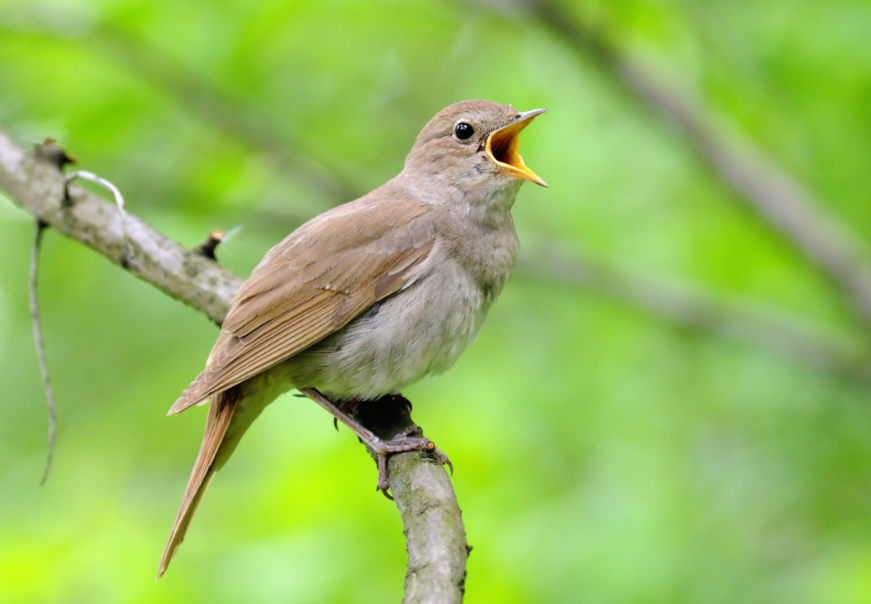
To create the high-fidelity 3D model of the nightingale, I will use Maya (Autodesk, Inc. , 1998), a powerful 3D modelling software renowned for its capability to produce detailed and realistic models. The process will begin with gathering comprehensive reference images and data on the nightingale to ensure anatomical accuracy and correct proportions. I will use Maya’s polygon modelling tools to craft the basic block-out of the bird, gradually refining it with detailed sculpting and adjustments to capture intricate features such as feather layering and beak structure. High-resolution textures will be developed using Substance Painter (Adobe, 2023) and it’s UV map baking feature to give the model life-like surface details, emphasizing realistic colour gradients and feather patterns. Once the model is complete and optimized for AR, I will export it with appropriate file formats to be integrated into Unity (Technologies, 2005). Using Unity’s AR framework and the ZapWorks plugin, I will implement interactivity and behaviours, such as perching and flying animations, tailored for the user experience.
To create the information overlays for the AR birdwatching app, I will use Photoshop (Adobe, 1990) to design visually appealing and informative graphics that match the app’s educational purpose. The process will involve designing clean, user-friendly layouts that include text, icons, and relevant visuals about the nightingale’s diet, habitat, migration patterns, and behaviour. Photoshop’s layering system will enable precise control over the arrangement of each element, ensuring clarity and readability. Once the overlays are complete, I will export them as PNG files with transparent backgrounds to maintain flexibility in Unity. These PNG files will be imported into Unity’s asset library and added to the scene as UI elements or canvas objects, ensuring that they can be displayed and interacted with seamlessly within the AR environment.

To ensure the accuracy and reliability of the bird information presented in the app, I will cross-reference all facts and educational content with reputable online databases, such as those provided by the British Trust for Ornithology (BTO, 1932) and the Royal Society for the Protection of Birds (RSPB, 1889). These organizations are authoritative sources of ornithological knowledge and provide comprehensive data on species’ characteristics, behaviours, habitats, migration patterns, and conservation status. By consulting these databases, I will verify details such as the nightingale’s diet, nesting habits, and song patterns.


To incorporate realistic audio elements, I will source appropriate sounds, such as the nightingale’s song and environmental background noises, from free sound libraries like Freesound.org, ensuring they are licensed for non-commercial or educational use. Once downloaded, I will import the audio files into Audition (Adobe, 2003) for editing and quality enhancement. In Audition, I will apply noise reduction, EQ adjustments, and normalization to improve clarity and consistency across the audio clips. This ensures that the sounds are immersive and well-suited for AR playback without sudden volume fluctuations or distortions. Edited and optimized audio files will be exported in a Unity-compatible format, such as WAV or MP3, and uploaded into Unity.
User feedback will be an integral part of refining the UX. Initial testing from peers will identify areas for improvement, such as interface adjustments . This iterative approach ensures the app evolves based on real-world user experiences, leading to an optimized and user-centric design.
Finally, the project will be uploaded to ZapWorks, to ensure seamless deployment and functionality, allowing users to view and interact with the nightingale within their own environment through a trigger image.
As an extension to the scope of the prototype I could explore and do additional research on the potential for adding gamification elements such as quizzes or challenges. I would conduct research into how educational games are integrated into similar applications to enhance user engagement. This would involve reviewing existing AR and educational apps that successfully incorporate gamification to analyse user interaction patterns, feedback, and retention rates. Sources such as academic journals, UX case studies, and user feedback reports would provide insights into best practices for designing these features. Additionally, I would study gamification frameworks, such as points systems, achievement badges, and interactive quizzes, that align with educational goals to boost learning retention and make the app more engaging. These elements could encourage users to test their knowledge about nightingales, identify bird calls, or complete challenges that unlock new animations or information. This extended research would help identify feasible and user-friendly ways to incorporate gamification into the app’s development, ensuring it remains both informative and fun.
_______________________________________________________________________________________________________
Project Plan
_______________________________________________________________________________________________________
Selecting the right project planning method is crucial for the successful development of my AR birdwatching prototype. Given the nature of the proposed app, which requires adaptability and user-centred development, Agile or Kanban would be the most suitable approaches. Agile would allow for iterative improvement and feedback integration, ensuring the app evolves with user needs. Kanban, on the other hand, provides flexibility and a visual task-tracking system that could be particularly effective for a solo developer or small team (Scheiner, 2024).
While Scrum offers structured progress, it may be too process-heavy for this type of project. Waterfall is the least suitable due to its rigid, linear nature that doesn’t align with iterative feedback and updates.
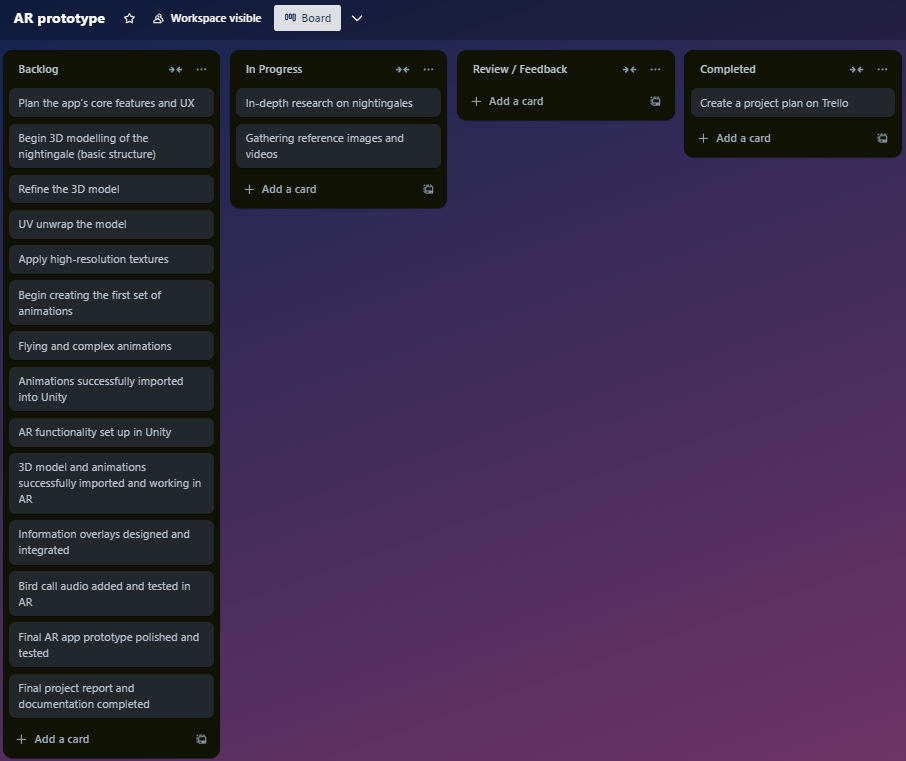
To design and develop my AR birdwatching app prototype, I will use the Kanban approach, leveraging software such as Trello (Atlassian, 2017) to visually manage and track the workflow. The Trello board will be organized into columns representing different stages of the project: “Backlog, In Progress, Review, and Completed”. Tasks such as research, 3D modelling, animation development, audio integration, and overlay design will be broken down into cards. This flexible approach allows for prioritization adjustments and efficient progress monitoring. The 3D model and animations of the nightingale will be given the most attention, as they form the central visual and interactive elements of the app. This phase will involve detailed modelling in Autodesk Maya and animation work, ensuring realistic behaviour such as perching and flying. The Kanban method will help allocate sufficient time and resources to this aspect while allowing me to address other development areas such as UI/UX design and information overlays concurrently, maintaining a balanced development pace.
I anticipate that the modelling itself will take me two or three weeks out of the total production schedule and I allocated a further two for the animation.
Week 1: Research & Planning
- Key Tasks:
- Conduct in-depth research on nightingales (behaviour, diet, habitat, etc.) using sources like the British Trust for Ornithology and the Royal Society for the Protection of Birds.
- Gather reference images, videos, and detailed information for creating the 3D model.
- Plan the app’s core features and user experience (UX), including UI elements and informational overlays.
- Create a project plan on Trello, breaking down tasks into manageable steps using the Kanban method.
- Milestones:
- Research documentation completed.
- Initial project plan and Trello board set up.
Week 2: 3D Modelling – Basic Structure
- Key Tasks:
- Begin 3D modelling of the nightingale in Autodesk Maya, starting with the basic structure (head, body, wings, and tail).
- Focus on ensuring accurate proportions and general shape, using the reference images gathered earlier.
- Set up a basic rig for the bird, allowing for simple animation later.
- Milestones:
- Basic 3D model structure completed.
- Initial bird rig setup.
Week 3: Detailed Modelling
- Key Tasks:
- Refine the 3D model by adding detailed features such as feathers, texture maps, and finer anatomical details.
- UV unwrap the model to prepare it for texturing.
- Apply high-resolution textures, ensuring they match the bird’s natural colours and patterns.
- Continue refining the rig for more complex animation movements.
- Milestones:
- Detailed 3D model with textures and UV mapping completed.
- Finalized bird rigging for animation.
Week 4: Animation – Basic Movements
- Key Tasks:
- Begin creating the first set of animations: perching and standing still.
- Ensure the bird’s movement is realistic by testing different poses and adjusting the rig for smooth motion.
- Start working on the bird’s idle animations, such as subtle movements (like head tilts or slight feather ruffling).
- Milestones:
- Basic perching and idle animations completed.
- Animations tested and refined for smooth transitions.
Week 5: Animation – Advanced Movements
- Key Tasks:
- Continue working on more complex animations, such as flying or flapping wings.
- Test the transitions between the perching, flying, and idle animations, ensuring natural fluidity.
- Start integrating these animations with Unity for testing in an AR environment.
- Milestones:
- Flying and complex animations completed.
- Animations successfully imported into Unity.
Week 6: AR Integration – Unity Setup
- Key Tasks:
- Set up the AR environment in Unity using AR Foundation or ZapWorks, ensuring compatibility with mobile devices.
- Import the 3D model and animations into Unity.
- Implement basic AR functionality (e.g., positioning the bird in the real world using the phone’s camera).
- Start testing how the animations work in AR and refine them as needed.
- Milestones:
- AR functionality set up in Unity.
- 3D model and animations successfully imported and working in AR.
Week 7: Information Overlays & Audio Integration
- Key Tasks:
- Design and create the informational overlays in Photoshop (e.g., text about diet, habitat, and behaviour of the nightingale).
- Integrate overlays into Unity and ensure they appear correctly when interacting with the bird model.
- Source and edit audio for the bird’s call, integrating it into Unity with spatial audio features.
- Test the user interactions with the AR model, ensuring the overlays are responsive and user-friendly.
- Milestones:
- Information overlays designed and integrated.
- Bird call audio added and tested in AR.
Week 8: Testing, Polishing & Final Review
- Key Tasks:
- Conduct user testing and gather feedback on usability, animations, and overall AR experience.
- Address any bugs or issues found during testing (e.g., animation glitches, UI issues, or audio problems).
- Polish the final app version, ensuring smooth interactions, optimal performance, and accurate educational content.
- Prepare final documentation, including the app’s functionality, user guide, and future potential extensions (such as adding more bird species or gamification features).
- Milestones:
- Final AR app prototype polished and tested.
- Final project report and documentation completed.
_______________________________________________________________________________________________________
References
Trium Designs (2022) Aviary https://www.3darpark.com/aviary/
Jeff Batt (2020) Understanding anchors in augmented reality experiences Learning Guild https://www.learningguild.com/articles/understanding-anchors-in-augmented-reality-experiences [Accessed 17th October 2024]
British Trust for Ornithology, BTO (1932) Understanding birds British Trust for Ornithology https://www.bto.org/understanding-birds/birdfacts/nightingale
The Royal Society for the Protection of Birds, RSPB (1889) Birds and wildlife The Royal Society for the Protection of Birds https://www.rspb.org.uk/birds-and-wildlife/nightingale
Data Protection Act (2018) Chapter 2 https://www.legislation.gov.uk/ [Accessed 27th October 2024]
Luis Talamantes (2023) Ar for everyone UX Collective https://uxdesign.cc/ar-for-everyone-how-to-build-accessible-augmented-reality-experiences-d6248b1a371a
Michael Scheiner (2024) Project Management Methodologies Comparison https://crm.org/news/project-management-methodologies
Software Mentioned
Adobe (1990) Photoshop [Software] https://www.adobe.com/uk/products/photoshop/
Adobe (2003) Audition [Software] https://www.adobe.com/uk/products/audition.html
Adobe (2023) Substance 3D 2024 [Software] https://www.adobe.com/products/substance3d/
Atlassian (2017) Trello https://trello.com [Software]
Autodesk, Inc. (1998) Autodesk Maya https://www.autodesk.com/uk/products/maya/ [Software]
Freesound Team (2005) Freesound https://freesound.org [Software]
Unity Technologies (2005) Unity https://unity.com [Software]
Zappar ltd. (2011) ZapWorks https://zap.works/ [Software]